What are animated mockups?
Animated mockups are After Effects project files that show your UI design inside a moving device — the camera pans, the device tilts, the scene plays out like a short video clip. Instead of a still screenshot, you get a 3–8 second video that looks like a proper product video.
They're used for app store previews, Dribbble shots, Instagram Reels, client presentations, and portfolio pieces. Anywhere a static image would work, an animated mockup works better.
Historically, animated mockups were used rarely – but as social media has started to prioritize video content (such as Instagram Reels, short-form TikTok clips, or video posts on X.com), animated mockups are rapidly becoming the best approach to present your work.
How animated mockups differ from static mockups
Static mockups are PSD files — you drop your design into a smart object, export a PNG, and get a still image. Animated mockups work the same way but the output is a video. The device is already animated, the screen tracking and masking are pre-built — you don't need to keyframe anything. Drop your design in, render, done.
What designs work well with animated mockups
Still images work fine — After Effects holds the frame for the full duration of the animation. But animated mockups really shine when the screen content is also moving: a scrolling feed, an onboarding flow, a loading animation. The combination of device motion and screen motion makes the result look like a real product video.
Example – Animated iPhone 17 Pro Mockups
How to use animated mockups
All you need is Adobe After Effects — no plugins, no third-party tools. If you have a Creative Cloud subscription, you already have it.
Placing your design
Adding your design to animated mockups is usually simple, though it might not be fully intuitive the first time. Here's a general outline of the steps you need to take.
- Unzip the downloaded folder and open the .aep file in After Effects
- Find the design composition, usually named "Your design here" or "Design" in the Project panel
- Drag your design (PNG, JPG, or video file) into that composition
- Your design won't fill the frame by default — right-click the layer → Transform → Fit to Comp to scale it correctly
- Switch to the main composition and hit Render
You might find that After Effects shows you an alert saying "After Effects: This project must be converted from version...". This is fine and happens because you're using a different version of AE than the one the project was prepared in. In this case, just confirm the conversion and you're good to go.
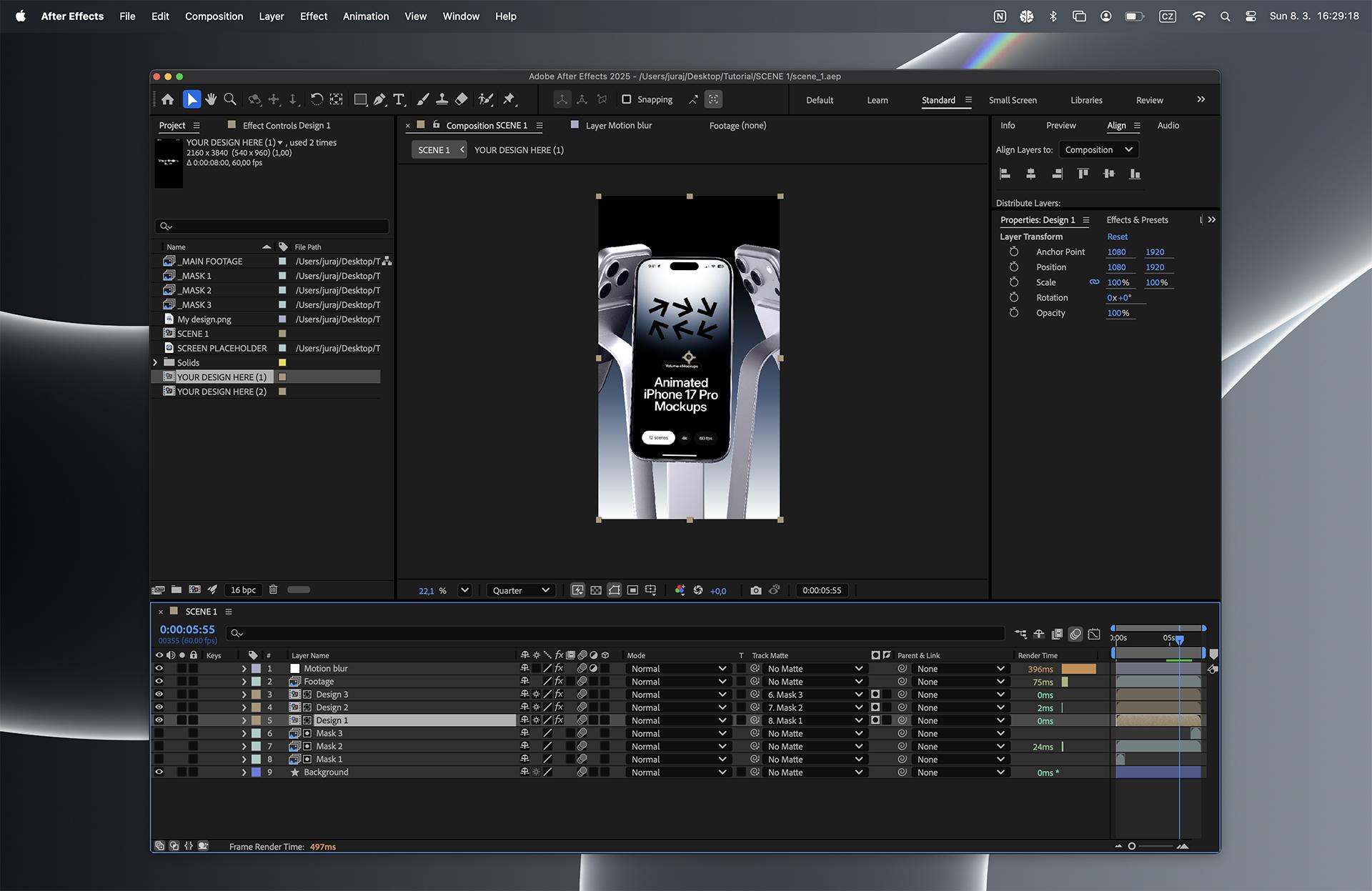
After Effects animated mockup project file
Where to use animated mockups
Once rendered, a 3–8 second device video works almost anywhere you'd use a static mockup — and performs better in most of them.
- Instagram Reels and TikTok: the 9:16 format packs, such as Animated Reels iPhone 17 Pro on Gradient Background are specifically made for this, with a tall aspect ratio that fills the whole screen. Drop the rendered video straight into Reels or a Story without any cropping or reformatting.
- Dribbble: animated shots get significantly more views than stills. Upload as a GIF to autoplay in the feed — a moving thumbnail stops the scroll in a way a static image rarely does.
- Behance: video embeds are supported within projects, making animated mockups a stronger presentation than a flat screenshot.
- App store previews: both the App Store and Google Play support short video previews at the top of a listing. An animated mockup is exactly the right format — short, polished, and focused on the UI.
- Client presentations: a short device video in a deck communicates the feel of the product better than a screenshot. It shows the design as something real, not just a flat image on a slide.
- SaaS and product launches: animated mockups are delivered at 4K 60fps, which makes them suitable as master footage for launch videos, landing page hero sections, and promotional content — not just social posts.
- Your portfolio: motion communicates interaction, transitions, and energy in a way a still image can't. An animated mockup shows not just what the design looks like, but how it feels to use.
If you're looking for animated mockups to work with, take a look at our Animated mockups library — delivered at 4K 60fps, with the screen tracking and masking already built in.